AI-generated content feels generic. That’s one of the most common frustrations content marketing managers report, and it’s usually not because the AI tool is bad. It’s because AI got applied to the wrong stage of the pipeline: full drafting from a thin prompt, with no brief, no proof requirements, and no human judgment on the output.
The useful question isn’t “should we use AI.” It’s “at which specific stage does AI genuinely save time without lowering quality, and where does it need to stay out entirely.”
The real problem: AI adoption without a stage-by-stage plan
Most teams adopt AI tools the same way: someone tries using it to write a full article, the output reads generically, and the team either abandons AI entirely or keeps using it and accepts the quality drop. Neither is a real strategy. The actual content pipeline has distinct stages: research, briefing, drafting, editing, QA, repurposing. AI’s usefulness varies enormously by stage.
Most content teams are explicitly unsure which AI workflows are genuinely useful, which is a reasonable position given how much of the current advice treats “use AI for content” as one undifferentiated task instead of six different ones.
The framework: the Pipeline Stage Map
Map AI usage against each stage of production, not the pipeline as a whole:
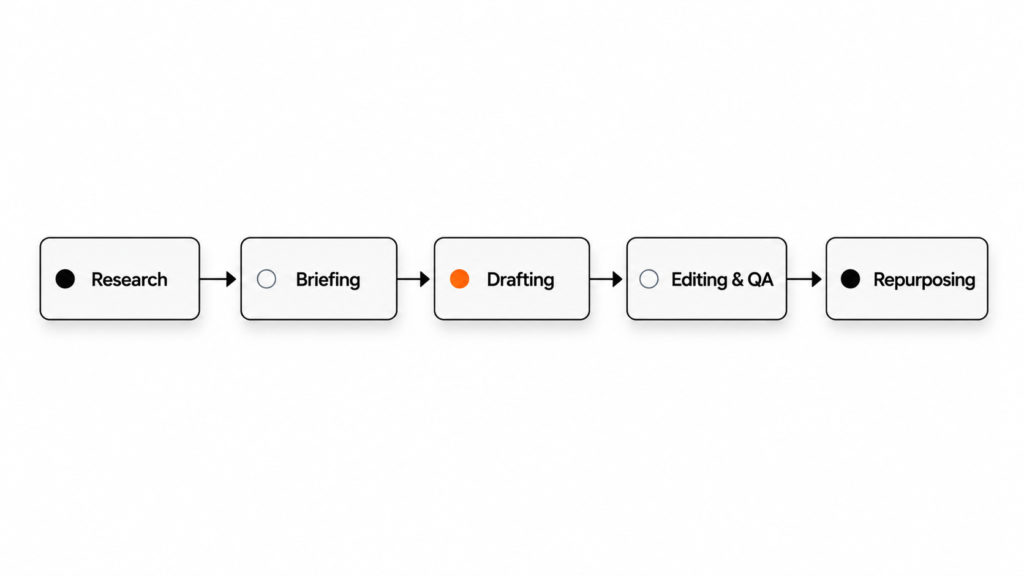
Research and audits: AI is strong here. Finding gaps across 100+ published pages, summarizing competitor content, or pulling patterns from customer interview transcripts are all tasks where AI’s speed advantage is large and the quality risk is low, since a human still interprets the output.
Briefing: AI can draft a first-pass brief from a target keyword and a style guide, but a human needs to confirm the angle actually matches the ICP’s real problem, not just a generic take on the topic.
Drafting: This is the highest-risk stage. AI can produce a structurally correct first draft, but left unsupervised, the language drifts toward generic phrasing and hedge-y “AI tells.” Use AI drafting only when paired with a strong brief, see the Eight-Field Brief, and a human edit pass that specifically checks for voice and specificity.
Editing and QA: AI is genuinely useful for catching structural issues: missing sections, weak openings that fail the Island Test, inconsistent terminology. It should flag, not fix. A human makes the final call on any suggested change.
Repurposing: Strong use case. Turning one blog post into five LinkedIn posts or a set of social captions is mechanical enough that AI handles the first pass well, with light human editing for platform-specific tone. This stage also compounds with good AEO structure. HubSpot reports meaningfully better conversion from visitors who arrive through AI-assisted search, since they’ve already absorbed context before clicking through.
How it holds up in practice
This map isn’t static. As AI tools improve, the risk profile of drafting may shift. Revisit this stage-by-stage assessment periodically rather than treating it as a permanent verdict. It also depends heavily on the specific tool and how well it’s briefed; a well-prompted AI tool with a detailed brief performs very differently from the same tool given a one-line prompt.
The honest framing, and the one worth repeating internally: AI can reduce repetitive work, but strong content still depends on human judgment. Anyone selling AI as a full replacement for editorial judgment is overselling it.
Who this is for
Any content team currently deciding how much to lean on AI tools, particularly teams under pressure to increase output without increasing headcount. This framework is most useful as a shared reference when onboarding a new AI tool, so the team agrees up front on which stages it’s approved for.
Common mistakes
The most common mistake is applying AI to full drafting without a detailed brief, then blaming the tool for generic output that a thin prompt was always going to produce. A close second is skipping human review at the editing stage because AI “already checked it.” AI can flag issues, but shouldn’t be the final quality gate. Teams also sometimes ban AI entirely after one bad drafting experience, missing genuinely strong use cases in research and repurposing.
FAQ
Which stage should a team start with if they’re new to AI tools?
Research and repurposing. Both have low quality risk and a clear time-saving win, which builds trust before moving into higher-risk stages like drafting.
Can AI replace a junior writer?
Not for stages requiring judgment about angle or voice. It can meaningfully speed up their research and first-draft structure, functioning more like a fast assistant than a replacement.
How do we brief an AI tool the way we’d brief a writer?
Give it the same eight-field brief you’d give a human: target reader, angle, structure, proof requirements, rather than a single-line topic prompt.
Should AI-assisted drafts be disclosed?
That’s a policy decision specific to your brand and audience expectations; what matters more operationally is that a human reviews every draft regardless of how it was produced.
What’s the biggest quality risk with AI drafting?
Generic phrasing and hedged claims that don’t commit to a specific angle. This is what the Island Test and voice one-pager are designed to catch.
How do we know if our AI workflow is actually saving time?
Track edit time per draft before and after introducing AI at a given stage. If edit time doesn’t drop, the tool isn’t being used at the right stage or with a strong enough brief.
Next step
Pick one stage, research, briefing, or repurposing, and formalize how your team uses AI there this week, rather than trying to overhaul the entire pipeline at once. If you’re already tracking the production-velocity gains AI creates, feed those numbers into your content-to-MQL reporting so the time saved shows up as a metric leadership actually sees.
What would you add to this framework?